Grade 7 - Chapter 14, Multimedia: Fill in the blanks.
By
Multimedia
Gap-fill exercise
Fill in all the gaps, then press "Check" to check your answers. Use the "Hint" button to get a free letter if an answer is giving you trouble. You can also click on the "[?]" button to get a clue. Note that you will lose points if you ask for hints or clues!
Grade 7 - Chapter 14 -Multimedia Practice
By
Match the following columns.
Matching exercise
Match the items on the right to the items on the left.
| Text | ||
| Audio | ||
| Video | ||
| Animation | ||
| Graphics |
How to take attendance in zoom
By
How to retrieve the attendance list for a Zoom meeting?
As Zoom can support up to 300 users in a single session, the hosts
may want to know who have joined the session and how long they stayed in
the session and what time they leave the session. To this end, Zoom
offers usage reports 30 minutes after a session is concluded.
To retrieve attendance list
- Visit https://eduhk.zoom.us and sign in with your EdUHK network account.
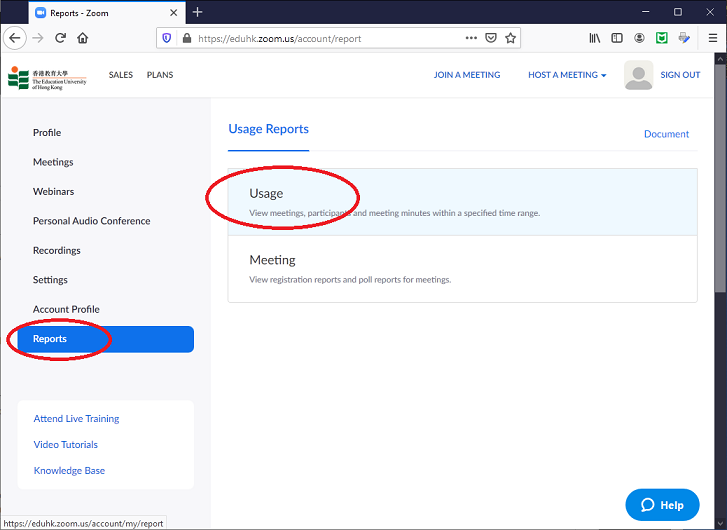
- On the Zoom portal, click Reports on the left panel and click Usage.
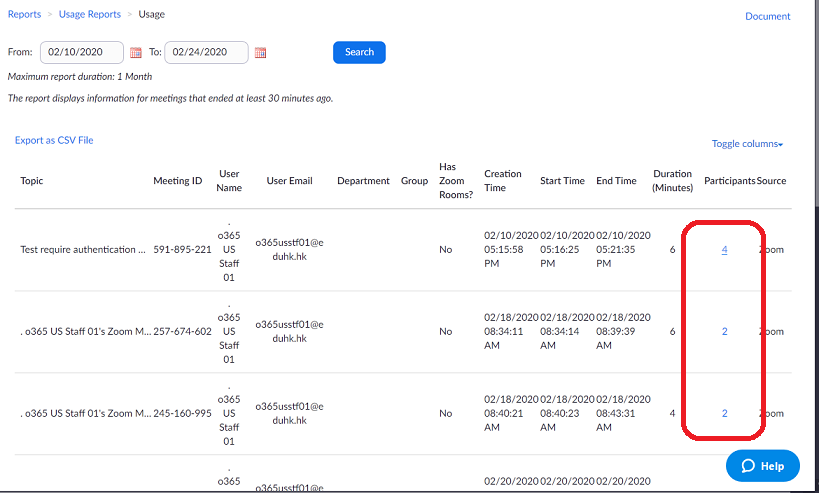
- Choose the time range and click Search and it will bring up a list of past meetings.
- From the meeting you look for, click on the number of participants.
- A pop-up screen with the list and details of participants will be
shown. If you need to have a unique name list, tick the option "Show unique users"
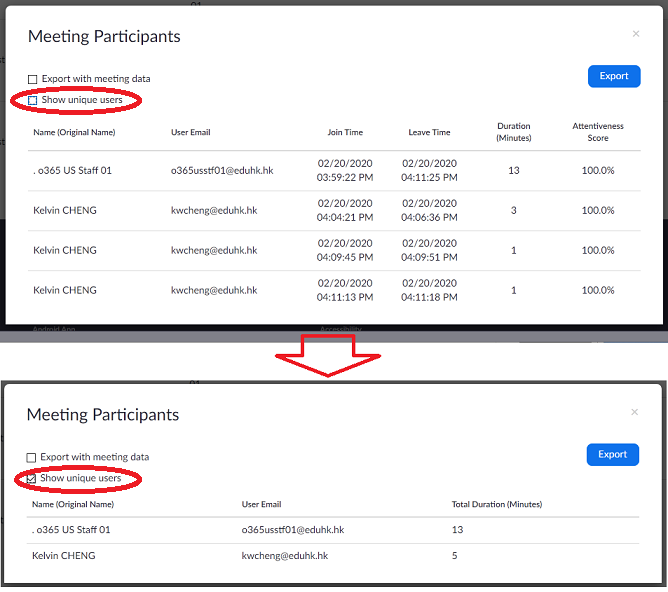
- You can generate an CVS file of the list by clicking the Export button.
Buy data pack for NTC mobile
By
Here is the website to buy data pack for NTC mobile.
http://offer.ntc.net.np/
To use this service we need PUK number of the mobile. To get the PUK number
1. check the welcome letter that we get while receiving the SIM
2. check the back of the card containing the SIM while receiving the SIM
3. type PUK and send SMS to 1415
We can also buy data pack using NTC mobile App (Nepal Telecom) https://play.google.com/store/apps/details?id=shirantech.android.nepaltelecom&hl=en
http://offer.ntc.net.np/
To use this service we need PUK number of the mobile. To get the PUK number
1. check the welcome letter that we get while receiving the SIM
2. check the back of the card containing the SIM while receiving the SIM
3. type PUK and send SMS to 1415
We can also buy data pack using NTC mobile App (Nepal Telecom) https://play.google.com/store/apps/details?id=shirantech.android.nepaltelecom&hl=en